

Table of Contents
- Are Smart Door Locks Worth It? The Honest Trade-Offs
- Smart Lock Security Vulnerabilities: What Actually Goes Wrong
- Smart Lock Battery Life Expectations: Power, Alerts, and Backup Plans
- How to Choose a Smart Lock That Fits Your Home
- Cybersecurity Hygiene and Accessibility: Two Angles Most Guides Skip
- When a Smart Lock Is Not Worth It
- Conclusion: Making the Call on Smart Door Locks
- Frequently Asked Questions
Last Updated: September 12, 2026
Are Smart Door Locks Worth It? The Honest Trade-Offs
Are smart door locks worth it for home security? For most households, yes, with conditions. Smart door locks are electronic deadbolt replacements that unlock via keypad, app, fingerprint, or voice command instead of a physical key. They solve real problems like lost keys, letting in a dog walker, and checking whether you locked up while you're at work, but they introduce failure modes a plain brass deadbolt never had. The honest answer depends less on the lock and more on how you reinforce the door around it.
Below, we break down what you gain, what you give up, and the two topics most buying guides skip.
What You Gain vs. What You Give Up
The convenience side is easy to sell. Keyless entry means no hiding a spare under the mat, no rekeying after a roommate moves out, and no fumbling for keys with an armful of groceries. Temporary guest codes let you hand a cleaner or contractor access that expires on its own.
The trade-off is dependency. A smart lock needs power, a network, and working software; when any fail, you need a mechanical override that still works.
- Gain: remote access, access logs, auto-lock, unique codes per person
- Give up: zero-maintenance simplicity, and the certainty that a dead battery never locks you out
- Keep: a physical key slot, on most models, as your fallback
That last point matters more than the spec sheet suggests: a lock with no keyway and a dead battery is a door you cannot open.
Smart Lock Security Vulnerabilities: What Actually Goes Wrong
Real-world smart lock security vulnerabilities split into two categories: digital weaknesses in the electronics and physical weaknesses in the door assembly. The digital side gets the headlines, but the physical side is where most residential break-ins happen, because a strike plate screwed into soft trim fails long before anyone bothers to hack a lock.
Digital Risks: Hacking, Encryption, and Firmware Updates
Most reported smart lock incidents trace back to poor digital hygiene, not sophisticated attacks. Weak passwords, unpatched firmware, and unsecured networks create openings an attacker can exploit. Encryption protects the signal between lock and phone, but only if you keep software current and credentials private.
The realistic threat model matters. A burglar is far more likely to try a pry bar, a bump key, or an unlocked window than to intercept your lock's Bluetooth signal. The digital risks that actually bite homeowners are mundane: a guest code that never expired, a default admin password left unchanged, firmware from two years ago. Defend against those first.
A few habits close most of that gap:
- Change the default admin password the day you install the lock, before it ever joins your network
- Turn on two-factor authentication in the lock's mobile application, and use an authenticator app rather than SMS where the option exists
- Apply firmware updates when they arrive, not months later; most manufacturers push security patches through the same channel as feature updates
- Keep the lock on a separate guest network or a dedicated IoT VLAN if your router supports one, so a compromised lock can't reach your laptop or file server
- Audit the user list every few months and delete codes for people who no longer need access
A common mistake is treating the lock like an appliance you install once and forget. It's a networked device needing the same attention as your router, but the effort is front-loaded: fifteen minutes of setup and a monthly two-minute review covers most realistic risk.
Physical Weak Points: Strike Plates, Frames, and the Anatomy of a Kick-In
Here's the part most guides skip, and it matters most. A deadbolt is only as strong as the frame it bolts into. When a door is kicked, force travels through the bolt, into the strike plate, and into the screws holding that plate to the frame. Standard strike plates ship with screws about three-quarters of an inch long that bite into softwood trim, not the structural stud behind it. A solid kick splits that trim, the plate tears free, and the door swings open, smart lock or not.
The fix costs very little and takes an afternoon:
- Replace the short strike-plate screws with 3-inch screws that reach the wall stud behind the trim. This single change is the highest-return upgrade most homeowners can make.
- Add a reinforced strike plate or a metal door-frame wrap that distributes kick force across a wider area of the frame.
- Confirm the deadbolt extends at least 1 inch into the frame when thrown. A bolt that barely clears the plate offers little resistance.
- Check that the door itself is solid, not hollow-core. A hollow-core door can be breached through the panel regardless of how strong the lock is.
- Look at the hinge side too. Exposed hinge pins on an outward-swinging door can be popped; security hinges or hinge-side pins close that gap.
Do this and you've closed the gap that matters most. Skip it and no amount of encryption saves a door that opens with one kick. A cheap mechanical deadbolt in a reinforced frame is more secure against forced entry than a premium smart lock in a flimsy one; the smart lock's value layers on top of that physical foundation, not a replacement for it.
Smart Lock Battery Life Expectations: Power, Alerts, and Backup Plans
Most smart locks run on four AA batteries and last six months to a year, depending on motor cycles and whether the lock holds a constant Wi-Fi connection (energy.gov). Bluetooth-only locks drain slower than Wi-Fi models because they aren't holding a live network link. Battery life should shape which lock you buy, not just how often you swap batteries.
Good locks warn you early: real-time notifications and a low-battery alert in the app give you weeks of runway. Cheap models sometimes skip that warning entirely, which is how people end up locked out.
Emergency power is your second layer. Many locks accept a 9-volt battery held against external contacts to jump the deadbolt for one entry; others take a USB power bank. Check which method your model uses before you need it, not during a rainstorm on your front step.
How to Choose a Smart Lock That Fits Your Home
Choosing a smart lock comes down to three questions: what door you have, what ecosystem you run, and who needs access. Answer those first and the feature list sorts itself out. Buy on brand hype and you'll end up with a lock that fits neither your door nor your phone.
Compatibility, Connectivity, and Installation Basics
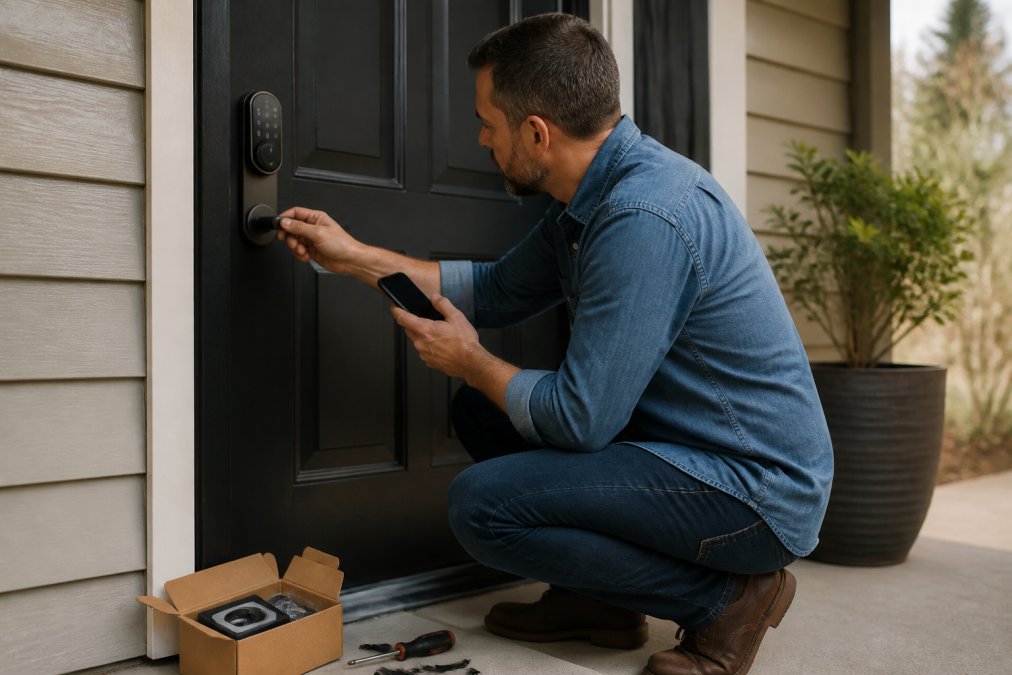
Start with the door. Measure the backset, the distance from the door edge to the center of the deadbolt hole, and confirm whether you have a standard cylindrical prep or something unusual. Most retrofit smart locks drop into an existing deadbolt hole, keeping installation to about 15 to 30 minutes with a screwdriver (hud.gov).
Then pick your connectivity:
- Bluetooth: simplest, no hub, works only when you're nearby
- Wi-Fi: remote access without extra hardware, but drains batteries faster
- Z-Wave or Zigbee: needs a smart home hub, best for whole-home automation
- Matter-compatible: the newest option, designed to work across ecosystems
If you already run a smart home hub, match the lock to it; if you don't, a Wi-Fi or Bluetooth lock avoids the extra purchase. Apple, Google, and Amazon ecosystems each have quirks, so check that your chosen lock works with the assistant you actually use.
Cybersecurity Hygiene and Accessibility: Two Angles Most Guides Skip
Two groups get overlooked in almost every smart lock review: people who need accessible entry and people who never think about cybersecurity until something breaks. Both deserve specific guidance rather than the generic advice most guides repeat.
Cybersecurity Hygiene: A Practical Routine for a Networked Lock
A smart lock is a small computer with a radio attached, deserving the same basic care as any connected device. The goal isn't defending against a nation-state; it's closing the ordinary gaps that turn a convenience feature into a liability. Here's a routine that covers realistic risk without turning you into a network administrator.
At setup:
- Change the default admin password immediately, and use a unique password you don't reuse anywhere else. A password manager makes this painless.
- Enable two-factor authentication in the lock's app. Prefer an authenticator app over SMS, since SMS codes can be intercepted through SIM-swap attacks (cisa.gov).
- Name the lock something neutral in the app. A device named "Front Door" tells anyone who glimpses your phone exactly which entry to target.
- Disable any remote-access feature you don't actually use. If you never unlock the door from a hotel, turn that capability off.
Ongoing:
- Apply firmware updates promptly. Manufacturers patch known vulnerabilities through these updates, and an unpatched lock is the most common digital weakness in practice.
- Review the access log monthly. It takes two minutes and it's how you catch a shared code that never got deleted after a contractor finished the job.
- Set guest codes to expire automatically rather than relying on yourself to remember to delete them.
- Keep the lock on a separate network segment if your router supports a guest network or IoT VLAN. This limits what a compromised lock could reach on your home network.
- Remove users who no longer need access, and rotate any code that was ever shared over text or email.
Network segmentation, explained simply: Most home routers offer a guest network that isolates connected devices from your main network. Putting your smart lock, cameras, and other IoT devices there means a compromised lock can't be a stepping stone to your laptop, file backups, or banking. You don't need enterprise hardware; the guest-network toggle in your router settings is usually enough.
Accessibility: Who Actually Benefits from Keyless Entry
A smart lock can be a genuine improvement for someone with arthritis, limited hand strength, or reduced dexterity. The twist-and-turn a stiff deadbolt demands is exactly the motion that becomes difficult with age or joint conditions. Fingerprint or keypad entry removes that motion entirely, and voice control can remove even the need to reach the lock.
For elderly users or anyone with limited mobility, a few features matter more than the spec sheet suggests:
- A keypad that doesn't require precise aim, since small buttons and tight spacing are hard on unsteady hands
- An adjustable auto-lock delay, so slower entry isn't rushed; a door that relocks in five seconds is a hazard for someone using a walker or cane
- A clear, loud low-battery indicator, ideally with an audible alert in addition to an app notification
- A physical key backup, which is safer than a fully keyless design for anyone who might struggle with a dead battery
- Compatibility with a smart assistant, so the door can be unlocked by voice from inside the home
For caregivers, remote access and access logs add reassurance: confirm a parent got home, grant a visiting nurse a temporary code, or check whether the door was locked without making a trip. That combination of independence for the user and visibility for the caregiver is one of the strongest arguments for a smart lock in a multigenerational household, and a use case most buying guides never mention.
When a Smart Lock Is Not Worth It
A smart lock is probably not worth it if your door frame is weak and you won't reinforce it, if you rent and can't modify the door, or if you have unreliable power and no interest in battery maintenance. In those cases, a quality mechanical deadbolt with long strike-plate screws delivers more real security for less money and zero upkeep.
It's also a poor fit if you want a lock you never think about. Smart locks reward a little attention; ignore the alerts and skip the updates, and you've bought a more expensive way to get locked out.
For everyone else, the calculus tilts the other way: a well-installed smart lock with a reinforced frame, current firmware, and a spare key beats a standard deadbolt on convenience and day-to-day security awareness.
Conclusion: Making the Call on Smart Door Locks
The honest answer is that smart locks are worth it when you treat them as part of a system, not a gadget. Reinforce the frame, keep the software current, watch the battery, and they earn their place. Skip those steps and you've added complexity without adding safety. Uniq Trenz offers a diverse and curated selection of trending lifestyle, home, and personal style essentials, including high-performance electronics and home improvement items. Our products are designed to enhance daily routines and personal style with ease and confidence, providing high-quality, durable, and often compact solutions. Browse the collection, compare the options that match your door and ecosystem, and start shopping with Uniq Trenz to find the right fit for your entryway.
Frequently Asked Questions
What are the disadvantages of a smart door lock?
Smart door locks depend on batteries, Wi-Fi or Bluetooth, and a mobile application to work. If the battery dies without warning or your network goes down, you may need the mechanical override key. Some models are also vulnerable to hacking if you skip firmware updates or reuse weak passwords. Physical weak points like a thin strike plate still apply, so a smart lock alone does not upgrade your door's structural strength.
Are smart locks more vulnerable to hacking than traditional locks?
A traditional deadbolt has no digital attack surface, so a smart lock adds risk that a mechanical lock does not have. That said, most break-ins still happen through forced entry, not hacking. Look for encryption, two-factor authentication, and regular firmware updates to reduce exposure. Bluetooth and Z-Wave or Zigbee connections are generally harder to attack remotely than Wi-Fi, which is worth weighing when you compare models.
Do smart locks void home insurance policies?
Most standard home insurance policies do not automatically void coverage because you install a smart lock. What matters is whether you meet the policy's security requirements, such as maintaining a working deadbolt. Some insurers offer discounts for connected security devices, so it is worth calling your provider before you buy. Keep records of installation and any certifications the lock carries.
How long does a smart lock battery usually last?
Most smart locks run on four AA batteries and last anywhere from six months to a year, depending on how often the lock is used and whether Wi-Fi is always on. Features like auto-lock, real-time notifications, and video drain power faster. Many models send a low-battery alert through the mobile application, and most include a mechanical override or emergency power option such as a 9V battery terminal.
Smart locks reward the homeowner who plans ahead and punish the one who doesn't. If you want a lock that fits your door, your phone, and your daily routine, Uniq Trenz curates durable, high-quality electronics and home improvement essentials in one place, so you can compare and choose without the guesswork. Get started with Uniq Trenz and upgrade your entryway with gear built to last.